
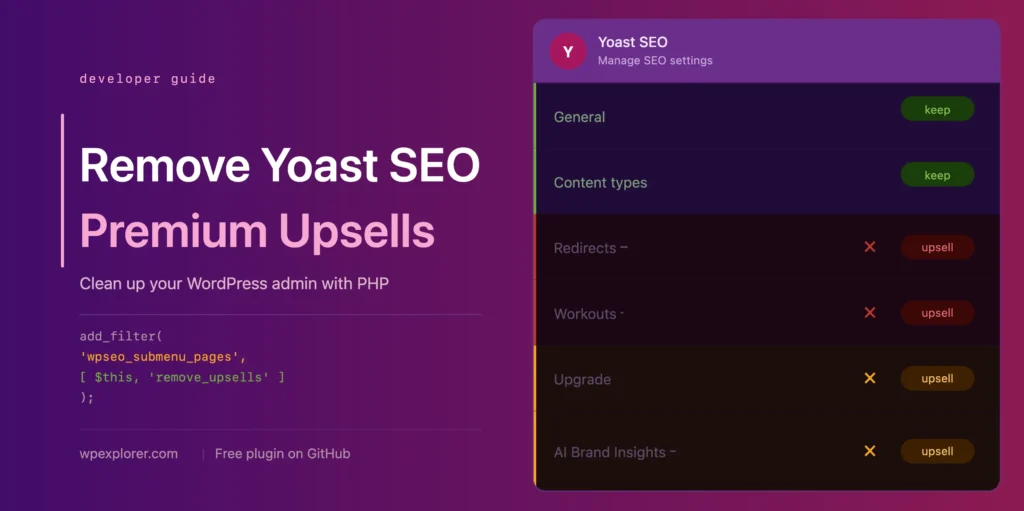
Yoast SEO is one of the most popular WordPress plugins in the world. Even the free version packs in useful features that help you optimize content, manage your sitemap, and improve how your site appears in search results. But if you’ve spent any time in the WordPress admin with it installed, you’ve probably noticed it comes with a lot of upsell noise.
Premium upgrade banners, extra admin menu pages, dashboard widgets and sidebar ads all pushing you toward the paid version. For developers managing client sites or anyone who just wants a clean admin interface, it can get pretty distracting.
Before we dive in, it’s worth mentioning that the simplest way to remove these upsells is by purchasing Yoast SEO Premium. This is what I’d recommend if it’s within your budget, since you get a ton of useful features like AI-generated titles and descriptions, a redirect manager, and multiple focus keywords. That said, not everyone needs those extras or is ready to pay for them.
If you’re sticking with the free version and just want a cleaner admin experience, keep reading. I’ll walk through how to remove the premium admin pages, upsell banners, dashboard widgets and more using simple PHP snippets you can add to your theme or a custom plugin.
TL;DR: If you just want the finished code, you can download the free wpex-remove-upsells-for-yoast-seo plugin from GitHub which packages everything in this guide into a single installable plugin. Or scroll down to the final class.
In this article
Setting Up the PHP ClassRemove Premium Admin PagesRemove Unnecessary Admin PagesRemove Upsell Buttons in Sidebar & Admin ToolbarRemove the Dashboard WidgetRemove Premium Banners on Admin PagesRemove Locked Premium Admin FieldsRemove Upsell Cards from the Integrations PageRemove Premium Upsells from the MetaboxesPutting It All Together
Setting Up the PHP Class
To keep things organized I’ve wrapped all the code into a single PHP class. Before we start adding any snippets, go ahead and add this empty class to your site. You can paste it into your child theme’s functions.php file, add it via a code snippets plugin or create a new MU plugin file.
if ( ! class_exists( ‘WPEX_Remove_Yoast_SEO_Upsells’ ) ) {
class WPEX_Remove_Yoast_SEO_Upsells {
public function __construct() {
if ( ! defined( ‘WPSEO_VERSION’ ) || defined( ‘WPSEO_PREMIUM_VERSION’ ) ) {
return;
}
}
}
new WPEX_Remove_Yoast_SEO_Upsells;
}
The class_exists check prevents any conflicts if the code is ever loaded more than once. Inside the constructor the WPSEO_VERSION check makes sure nothing runs unless Yoast SEO is active on the site. The WPSEO_PREMIUM_VERSION check exits early if you already have Yoast SEO Premium installed since you won’t need any of this code in that case.
Remove Premium Admin Pages
Yoast SEO registers several admin pages that are only useful if you have the premium version installed. Pages like Redirects and Workouts serve no purpose in the free version and just lead to an upgrade screen when clicked.
We can hook into the wpseo_submenu_pages filter and automatically detect premium pages by checking for the premium badge HTML that Yoast injects into the menu title. This approach eliminates the need to manually define a list of pages to remove, since the code automatically detects and removes any premium page. However, if Yoast changes how it inserts the badge in the future, you may need to update the code.
Add the following add_filter calls inside your constructor:
// Remove premium admin pages and upsell buttons from the Yoast submenu
add_filter( ‘wpseo_submenu_pages’, [ $this, ‘remove_premium_admin_pages’ ], PHP_INT_MAX );
add_filter( ‘wpseo_network_submenu_pages’, [ $this, ‘remove_premium_admin_pages’ ], PHP_INT_MAX );
We hook into wpseo_network_submenu_pages as well to make sure the same removals apply on multisite network admin pages. The priority of PHP_INT_MAX ensures our filter runs after Yoast has finished registering all of its pages.
Then add the following method after your constructor:
/**
* Removes any Yoast submenu pages that are flagged as premium
* by checking for the presence of the premium badge in the menu title.
*/
public function remove_premium_admin_pages( array $pages ): array {
return array_filter( $pages, function( $page ) {
// Remove pages flagged with the premium badge (e.g. Redirects, Workouts)
if ( isset( $page[2] ) && str_contains( $page[2], ‘yoast-premium-badge’ ) ) {
return false;
}
return true;
} );
}
If you’d prefer a more explicit approach you can use the same filter but check for specific page slugs instead:
public function remove_premium_admin_pages( array $pages ): array {
$pages_to_remove = [
‘wpseo_redirects’,
‘wpseo_workouts’,
];
return array_filter( $pages, function( $page ) use ( $pages_to_remove ) {
if ( isset( $page[4] ) && in_array( $page[4], $pages_to_remove, true ) ) {
return false;
}
return true;
} );
}
The downside to this approach is that you’ll need to manually update the list if Yoast adds new premium pages down the line.
Remove Unnecessary Admin Pages

Yoast SEO doesn’t hide all of its admin pages behind an upgrade overlay, but that doesn’t mean they’re all worth keeping. Some pages are registered in the free version that serve little to no purpose for most users and just add clutter to your dashboard.
Plans: Is a page dedicated to comparing and purchasing Yoast’s premium plans and add-ons. It does include a link to install Yoast Duplicate Post which is a free plugin, but everything else on the page is a paid product. For the most part it’s a sales page and not something you’ll need day to day.
Academy: Links to Yoast’s online learning platform. While there are a handful of free courses available, they’re locked behind a Yoast account and open in an external browser tab rather than anything available directly in your dashboard. The majority of the content is premium and the page is largely a sales funnel.
Support: Is essentially a collection of links pointing to yoast.com/help, the WordPress support forums, the bug report doc page and the Yoast help center. There’s nothing here you can’t bookmark directly and access whenever you need it, so there’s no real reason to have it taking up space in your menu.
To remove any or all of them, update the remove_premium_admin_pages method we created earlier to include the relevant slugs in the $pages_to_remove array:
/**
* Removes any Yoast submenu pages that are flagged as premium
* by checking for the presence of the premium badge in the menu title.
* Also removes the Upgrade upsell button and other unnecessary admin pages.
*/
public function remove_premium_admin_pages( array $pages ): array {
$pages_to_remove = [
‘wpseo_upgrade_sidebar’,
‘wpseo_licenses’,
‘wpseo_page_academy’,
‘wpseo_page_support’,
];
return array_filter( $pages, function( $page ) use ( $pages_to_remove ) {
// Remove pages flagged with the premium badge (e.g. Redirects, Workouts)
if ( isset( $page[2] ) && str_contains( $page[2], ‘yoast-premium-badge’ ) ) {
return false;
}
// Remove the Upgrade sidebar button and other unnecessary pages
if ( isset( $page[4] ) && in_array( $page[4], $pages_to_remove, true ) ) {
return false;
}
return true;
} );
}
Remove Upsell Buttons in Sidebar & Admin Toolbar

Yoast also adds two upsell buttons that show up in two places, the sidebar navigation and the admin toolbar at the top of the screen. These are the Upgrade button and the AI Brand Insights button, and neither of them serve any purpose in the free version.
Removing the Upgrade Button
The Upgrade button is registered through the same wpseo_submenu_pages filter we already hooked into, so we just need to add one more check to the remove_premium_admin_pages method we created in the previous section. The AI Brand Insights button however needs a different approach which we’ll cover further down.
Go ahead and update the remove_premium_admin_pages method to look like this:
/**
* Removes any Yoast submenu pages that are flagged as premium
* by checking for the presence of the premium badge in the menu title.
* Also removes the Upgrade upsell button from the sidebar navigation.
*/
public function remove_premium_admin_pages( array $pages ): array {
$upsell_pages = [
‘wpseo_upgrade_sidebar’,
];
return array_filter( $pages, function( $page ) use ( $upsell_pages ) {
// Remove pages flagged with the premium badge (e.g. Redirects, Workouts)
if ( isset( $page[2] ) && str_contains( $page[2], ‘yoast-premium-badge’ ) ) {
return false;
}
// Remove the Upgrade sidebar button
if ( isset( $page[4] ) && in_array( $page[4], $upsell_pages, true ) ) {
return false;
}
return true;
} );
}
Removing the AI Brand Insights Button
The AI Brand Insights button is a special case. Yoast registers it at PHP_INT_MAX priority on the wpseo_submenu_pages filter, which means we can’t reliably remove it through the same filter since we have no way of running after it. Instead we can remove it directly using WordPress’s remove_submenu_page function inside the admin_menu hook.
Add the following to your constructor:
// Remove the AI Brand Insights sidebar button
add_action( ‘admin_menu’, [ $this, ‘remove_upsell_submenu_pages’ ], PHP_INT_MAX );
Then add this method after your constructor:
/**
* Removes the AI Brand Insights sidebar button directly from
* the admin menu after all pages have been registered.
*/
public function remove_upsell_submenu_pages(): void {
remove_submenu_page( ‘wpseo_dashboard’, ‘wpseo_brand_insights’ );
}
Removing the Buttons from the Admin Toolbar
The same two buttons also appear in the Yoast SEO menu in the admin toolbar at the top of the screen. To remove them we need a separate method that hooks into admin_bar_menu. Add the following to your constructor:
// Remove upsell buttons from the admin toolbar
add_action( ‘admin_bar_menu’, [ $this, ‘remove_admin_bar_links’ ], PHP_INT_MAX );
Then add this method after your constructor:
/**
* Removes the Upgrade and AI Brand Insights upsell buttons
* from the Yoast SEO admin toolbar menu.
*
* @param WP_Admin_Bar $wp_admin_bar Admin bar instance.
*/
public function remove_admin_bar_links( WP_Admin_Bar $wp_admin_bar ): void {
$wp_admin_bar->remove_node( ‘wpseo-get-premium’ );
$wp_admin_bar->remove_node( ‘wpseo_brand_insights’ );
}

Yoast SEO adds a dashboard widget to your WordPress admin that is split into two parts. The top half shows an overview of your site’s SEO scores, and the bottom half displays the latest blog posts from Yoast.com.
The widget makes an uncached HTTP request to yoast.com/feed/widget/ every single time you load the dashboard, which adds unnecessary overhead. It also sends your WordPress and PHP version as query string parameters with every request, exposing your server environment to Yoast on each dashboard visit. For most people this widget just isn’t worth the overhead and is best removed entirely.
Add the following to your constructor:
// Remove the Yoast SEO dashboard widget and its assets
add_action( ‘wp_dashboard_setup’, [ $this, ‘remove_dashboard_widget’ ], PHP_INT_MAX );
add_action( ‘admin_enqueue_scripts’, [ $this, ‘remove_dashboard_widget_assets’ ], PHP_INT_MAX );
Then add these methods after your constructor:
/**
* Removes the Yoast SEO dashboard widget.
*/
public function remove_dashboard_widget(): void {
remove_meta_box( ‘wpseo-dashboard-overview’, ‘dashboard’, ‘normal’ );
}
/**
* Dequeues the Yoast SEO dashboard widget scripts and styles.
*/
public function remove_dashboard_widget_assets(): void {
$current_screen = get_current_screen();
if ( ! ( $current_screen instanceof WP_Screen && $current_screen->id === ‘dashboard’ ) ) {
return;
}
wp_dequeue_script( ‘yoast-seo-dashboard-widget’ );
wp_dequeue_style( ‘yoast-seo-wp-dashboard’ );
wp_dequeue_style( ‘yoast-seo-monorepo’ );
}
Remove Premium Banners on Admin Pages

Yoast SEO injects two promotional banners into its admin settings pages as JavaScript components. One appears at the bottom of the page as an upgrade advertisement, and the other is a sticky sidebar that contains an upgrade prompt followed by a “Learn SEO” widget with links back to Yoast.com.
Because these are rendered as JS components they can’t be removed with PHP hooks. They also don’t have any unique class names or IDs we can use to target them cleanly with CSS. The selectors below work by targeting their position and structure within the Yoast admin layout, which means they could stop working if Yoast ever modifies their page structure or design. That said they’re the most reliable option available without overriding JS components.
Add the following to your constructor:
// Remove premium banners from Yoast admin pages
add_action( ‘admin_enqueue_scripts’, [ $this, ‘remove_upsells_from_admin_pages’ ], PHP_INT_MAX );
Then add this method after your constructor:
/**
* Hides the premium upgrade banner and sticky sidebar on Yoast
* admin pages using inline CSS. These are JS components with no
* unique identifiers so CSS targeting is the only viable option.
* This may need updating if Yoast changes their admin page layout.
*/
public function remove_upsells_from_admin_pages(): void {
$current_screen = get_current_screen();
if ( ! ( $current_screen instanceof WP_Screen && str_contains( $current_screen->id, ‘wpseo_’ ) ) ) {
return;
}
$css=”
#yoast-seo-general .yst-\@container > div:last-child:has([data-action=load-nfd-ctb]),
#yoast-seo-general .yst-min-w-\[16rem\]:has(>.yst-sticky),
#yoast-seo-settings main + div:has([data-action=load-nfd-ctb]),
#yoast-seo-settings .yst-root div[class*=yst-fixed],
.seo_page_wpseo_tools .wpseo_content_cell .yoast_premium_upsell,
.seo_page_wpseo_tools #sidebar-container.wpseo_content_cell { display: none !important; }
“;
wp_register_style( ‘wpex-remove-yoast-upsells’, false );
wp_enqueue_style( ‘wpex-remove-yoast-upsells’ );
wp_add_inline_style( ‘wpex-remove-yoast-upsells’, $css );
}
Remove Locked Premium Admin Fields
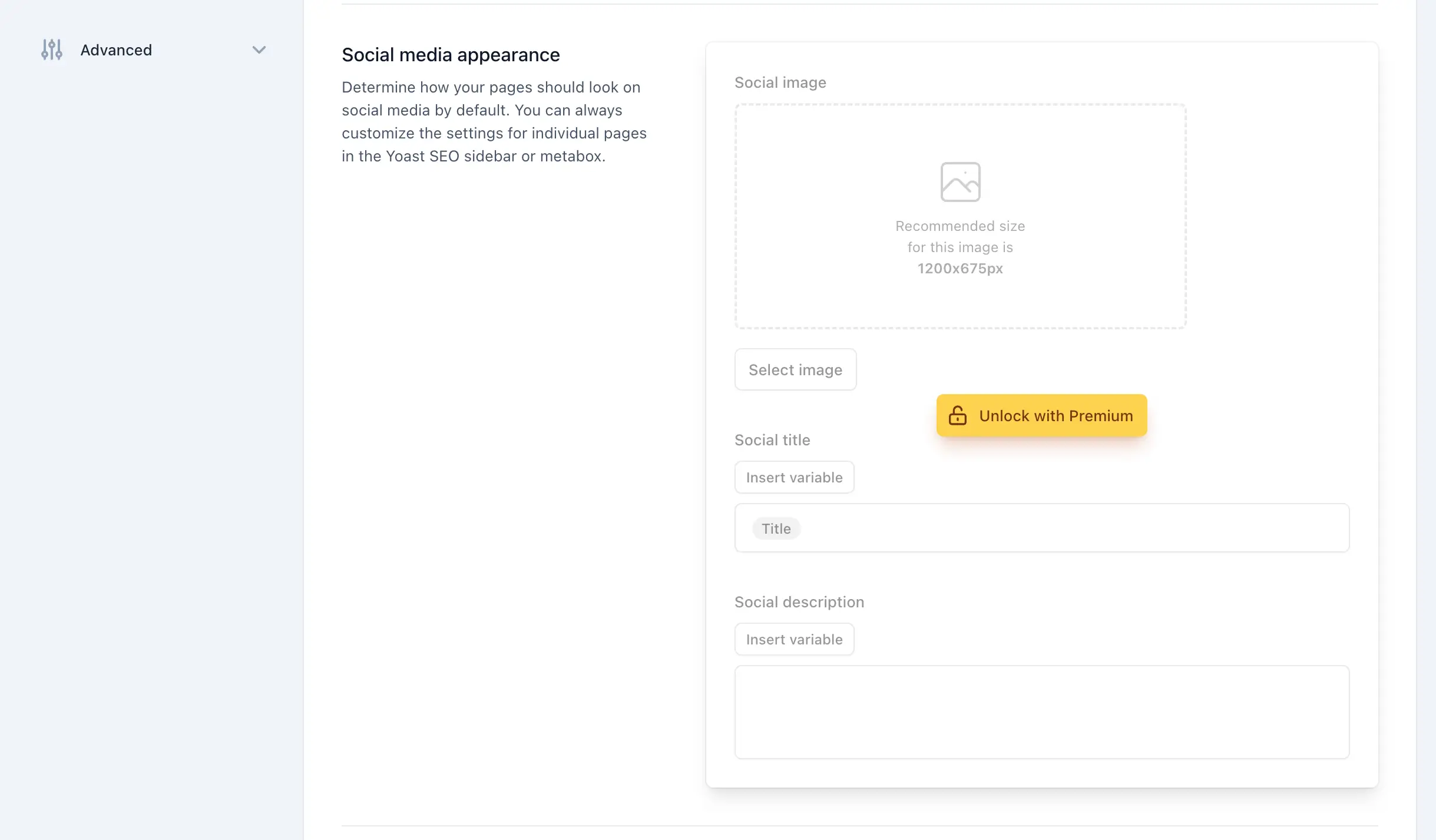
Throughout the Yoast SEO settings pages you’ll come across various field sets and options that are locked behind a premium upgrade. These locked fields serve no purpose in the free version and just add visual noise to an otherwise functional settings page.
Luckily Yoast gives us two reliable hooks to target these elements with CSS. Individual locked fields use a yst-button–upsell class on their upgrade button, while entire sections that are locked behind an upgrade overlay use a dedicated yst-feature-upsell class on the section itself. Together these two classes let us target both individual fields and full section upsells without relying on fragile structural selectors.
We’ll update the CSS string in the remove_upsells_from_admin_pages method we created in the previous section to include these additional selectors:
public function remove_upsells_from_admin_pages(): void {
$current_screen = get_current_screen();
if ( ! ( $current_screen instanceof WP_Screen && str_contains( $current_screen->id, ‘wpseo’ ) ) ) {
return;
}
$css=”
#yoast-seo-general .yst-\@container > div:last-child:has([data-action=load-nfd-ctb]),
#yoast-seo-general .yst-min-w-\[16rem\]:has(>.yst-sticky),
#yoast-seo-settings main + div:has([data-action=load-nfd-ctb]),
#yoast-seo-settings .yst-root div[class*=yst-fixed],
#yoast-seo-settings main section .yst-feature-upsell,
#yoast-seo-settings main section.yst-grid:has(fieldset > .yst-space-y-8 > .yst-feature-upsell:only-child),
#yoast-seo-settings main section.yst-grid:has(fieldset > .yst-space-y-8 > .yst-feature-upsell:only-child) + hr,
#yoast-seo-settings main form fieldset > .yst-flex > .yst-divide-y > .yst-py-4:has(.yst-button–upsell),
#yoast-seo-settings main fieldset.yst-group > ul > li:has([data-action=load-nfd-ctb]),
.yst-root .yst-table-row:has(.yst-button–upsell),
.seo_page_wpseo_tools .wpseo_content_cell .yoast_premium_upsell,
.seo_page_wpseo_tools #sidebar-container.wpseo_content_cell { display: none !important; }
“;
wp_register_style( ‘wpex-remove-yoast-upsells’, false );
wp_enqueue_style( ‘wpex-remove-yoast-upsells’ );
wp_add_inline_style( ‘wpex-remove-yoast-upsells’, $css );
}
Since we’re hiding elements based on CSS classes and attributes rather than unique identifiers, we’ve tried to be as specific as possible with the selectors to avoid accidentally removing any useful settings.
That said it’s worth testing your Yoast settings pages thoroughly with and without the CSS applied to make sure nothing important has been hidden, particularly if you have any premium add-ons installed that may add their own fields alongside the free ones.
Keep in mind that these selectors may also need to be updated in future versions of Yoast SEO if they make any changes to their admin page design or class naming conventions.
Remove Upsell Cards from the Integrations Page
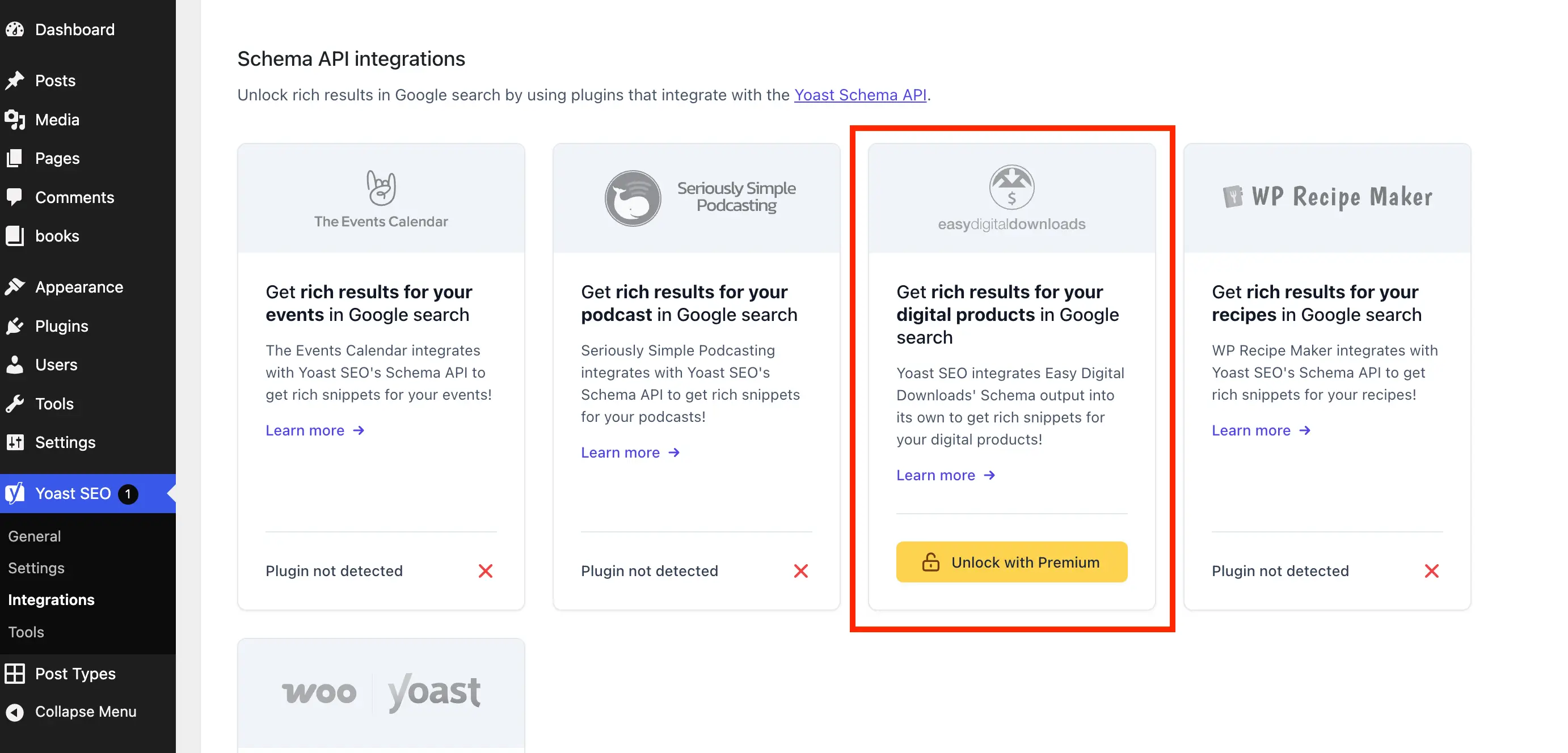
The Yoast SEO integrations page lists all of the third party tools and plugins that Yoast SEO can connect with. While many of these integrations are available for free, some cards on the page show an “Unlock with Premium” button. We can hide these using the same CSS approach as before.
Update the remove_upsells_from_admin_pages method to add a check for the integrations page screen and enqueue the additional CSS. Since the integrations page has its own unique ID we can target the upsell cards quite precisely without any risk of accidentally hiding free integration cards.
Add the following to the CSS string in the remove_upsells_from_admin_pages method:
#wpseo-integrations .yst-root section > .yst-grid > div:has([data-action=load-nfd-ctb])
So the full updated CSS string becomes:
$css=”
#yoast-seo-general .yst-\@container > div:last-child:has([data-action=load-nfd-ctb]),
#yoast-seo-general .yst-min-w-\[16rem\]:has(>.yst-sticky),
#yoast-seo-settings main + div:has([data-action=load-nfd-ctb]),
#yoast-seo-settings .yst-root div[class*=yst-fixed],
#yoast-seo-settings main section .yst-feature-upsell,
#yoast-seo-settings main section.yst-grid:has(fieldset > .yst-space-y-8 > .yst-feature-upsell:only-child),
#yoast-seo-settings main section.yst-grid:has(fieldset > .yst-space-y-8 > .yst-feature-upsell:only-child) + hr,
#yoast-seo-settings main form fieldset > .yst-flex > .yst-divide-y > .yst-py-4:has(.yst-button–upsell),
#yoast-seo-settings main fieldset.yst-group > ul > li:has([data-action=load-nfd-ctb]),
#wpseo-integrations .yst-root section > .yst-grid > div:has([data-action=load-nfd-ctb]),
.yst-root .yst-table-row:has(.yst-button–upsell),
.seo_page_wpseo_tools .wpseo_content_cell .yoast_premium_upsell,
.seo_page_wpseo_tools #sidebar-container.wpseo_content_cell { display: none !important; }
“;
Keep in mind that hiding individual upsell cards may leave an empty section heading visible on the integrations page if all the integrations for that section are upsells.
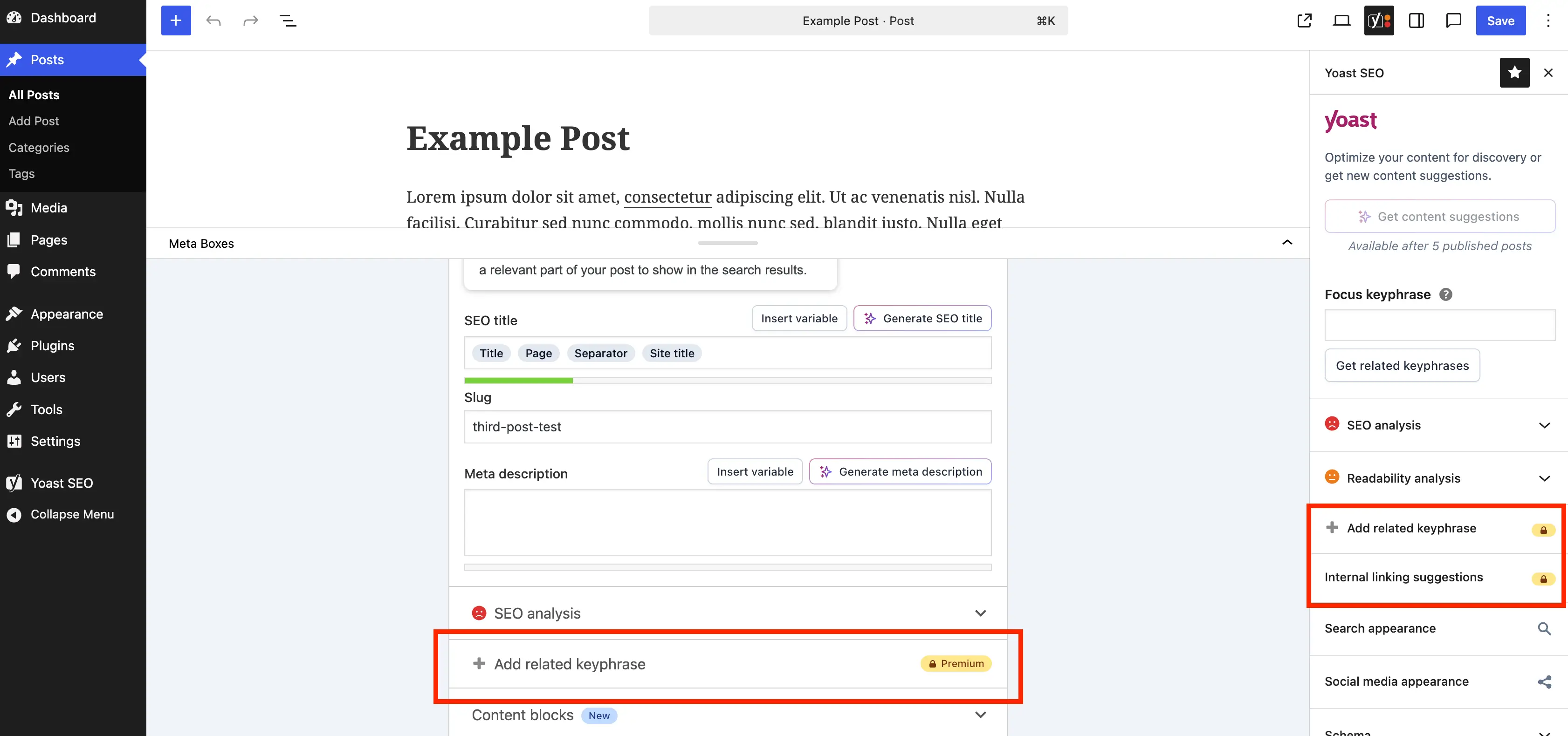
Yoast SEO adds a metabox at the bottom of the WordPress editor and custom Gutenberg sidebar, both of which contain several sections that are only available in the premium version. These show up every time you edit a post or page which makes them more intrusive than the admin page upsells since you’re likely spending a lot more time in the editor than in the Yoast settings.
Since these are also rendered as JS components we’ll use the same CSS approach as before, this time loading the styles only on post editor screens to keep things lean.
Add the following to your constructor:
// Remove premium upsells from the metaboxes
add_action( ‘admin_enqueue_scripts’, [ $this, ‘remove_upsells_from_metaboxes’ ], PHP_INT_MAX );
Then add this method after your constructor:
/**
* Hides premium upsell fields and buttons from the Yoast SEO
* metabox and block editor sidebar panel using inline CSS.
* This may need updating if Yoast changes their metabox design.
*/
public function remove_upsells_from_metaboxes(): void {
$current_screen = get_current_screen();
if ( ! ( $current_screen instanceof WP_Screen && in_array( $current_screen->base, [ ‘post’, ‘term’ ], true ) ) ) {
return;
}
$css=”
.wpseo-metabox-content div:has(> button > .yst-badge–upsell),
:is(.wpseo-metabox-content,.yoast-modal-content) .yoast-prominent-words,
:is(.wpseo-metabox-content,#yoast-seo\:seo-sidebar) .yst-root > div > button[data-id*=AIFixes],
.wpseo-metabox-content .collapsible_content > .yst-flex:has(.yst-badge–upsell),
.wpseo-metabox-content .collapsible_content > .yst-flex:has(.yst-badge–upsell) + hr,
:is(.wpseo-metabox-content,.yoast-modal-content) .yst-feature-upsell–card,
#yoast-seo\:seo-sidebar .components-panel > div:has(.yst-badge–upsell),
#premium-seo-analysis-upsell-ad-sidebar,
#premium-seo-analysis-upsell-ad-metabox { display: none !important; }
“;
wp_register_style( ‘wpex-remove-yoast-metabox-upsells’, false );
wp_enqueue_style( ‘wpex-remove-yoast-metabox-upsells’ );
wp_add_inline_style( ‘wpex-remove-yoast-metabox-upsells’, $css );
}
Test your editor thoroughly with and without the CSS to ensure it doesn’t hide any fields you need. Also note that you may need to update these selectors if Yoast SEO changes its editor integration in a future release.
Putting It All Together
That covers all the main upsell elements Yoast SEO adds in the free version. If you’ve been following along you should now have a much cleaner and leaner WordPress admin without any of the upgrade prompts, unnecessary pages, or premium banners getting in the way.
Below is the complete PHP class that combines all snippets from this guide into a single copy-and-paste block.
if ( ! class_exists( ‘WPEX_Remove_Yoast_SEO_Upsells’ ) ) {
class WPEX_Remove_Yoast_SEO_Upsells {
/**
* Class Constructor.
*/
public function __construct() {
if ( ! defined( ‘WPSEO_VERSION’ ) || defined( ‘WPSEO_PREMIUM_VERSION’ ) ) {
return;
}
// Remove premium admin pages and upsell buttons from the Yoast submenu
add_filter( ‘wpseo_submenu_pages’, [ $this, ‘remove_premium_admin_pages’ ], PHP_INT_MAX );
add_filter( ‘wpseo_network_submenu_pages’, [ $this, ‘remove_premium_admin_pages’ ], PHP_INT_MAX );
// Remove upsell buttons from the admin toolbar
add_action( ‘admin_bar_menu’, [ $this, ‘remove_admin_bar_links’ ], PHP_INT_MAX );
// Remove the AI Brand Insights sidebar button
add_action( ‘admin_menu’, [ $this, ‘remove_upsell_submenu_pages’ ], PHP_INT_MAX );
// Remove the Yoast SEO dashboard widget and its assets
add_action( ‘wp_dashboard_setup’, [ $this, ‘remove_dashboard_widget’ ], PHP_INT_MAX );
add_action( ‘admin_enqueue_scripts’, [ $this, ‘remove_dashboard_widget_assets’ ], PHP_INT_MAX );
// Remove premium banners from Yoast admin pages
add_action( ‘admin_enqueue_scripts’, [ $this, ‘remove_upsells_from_admin_pages’ ], PHP_INT_MAX );
// Remove premium upsells from the metaboxes
add_action( ‘admin_enqueue_scripts’, [ $this, ‘remove_upsells_from_metaboxes’ ], PHP_INT_MAX );
}
/**
* Removes any Yoast submenu pages that are flagged as premium
* by checking for the presence of the premium badge in the menu title.
* Also removes the Upgrade upsell button and other unnecessary admin pages.
*/
public function remove_premium_admin_pages( array $pages ): array {
$pages_to_remove = [
‘wpseo_upgrade_sidebar’,
‘wpseo_licenses’,
‘wpseo_page_academy’,
‘wpseo_page_support’,
];
return array_filter( $pages, function( $page ) use ( $pages_to_remove ) {
// Remove pages flagged with the premium badge (e.g. Redirects, Workouts)
if ( isset( $page[2] ) && str_contains( $page[2], ‘yoast-premium-badge’ ) ) {
return false;
}
// Remove the Upgrade sidebar button and other unnecessary pages
if ( isset( $page[4] ) && in_array( $page[4], $pages_to_remove, true ) ) {
return false;
}
return true;
} );
}
/**
* Removes the Upgrade and AI Brand Insights upsell buttons
* from the Yoast SEO admin toolbar menu.
*
* @param WP_Admin_Bar $wp_admin_bar Admin bar instance.
*/
public function remove_admin_bar_links( WP_Admin_Bar $wp_admin_bar ): void {
$wp_admin_bar->remove_node( ‘wpseo-get-premium’ );
$wp_admin_bar->remove_node( ‘wpseo_brand_insights’ );
}
/**
* Removes the AI Brand Insights sidebar button directly from
* the admin menu after all pages have been registered.
*/
public function remove_upsell_submenu_pages(): void {
remove_submenu_page( ‘wpseo_dashboard’, ‘wpseo_brand_insights’ );
}
/**
* Removes the Yoast SEO dashboard widget.
*/
public function remove_dashboard_widget(): void {
remove_meta_box( ‘wpseo-dashboard-overview’, ‘dashboard’, ‘normal’ );
}
/**
* Dequeues the Yoast SEO dashboard widget scripts and styles.
*/
public function remove_dashboard_widget_assets(): void {
$current_screen = get_current_screen();
if ( ! ( $current_screen instanceof WP_Screen && $current_screen->id === ‘dashboard’ ) ) {
return;
}
wp_dequeue_script( ‘yoast-seo-dashboard-widget’ );
wp_dequeue_style( ‘yoast-seo-wp-dashboard’ );
wp_dequeue_style( ‘yoast-seo-monorepo’ );
}
/**
* Hides the premium upgrade banner and sticky sidebar on Yoast
* admin pages using inline CSS.
*/
public function remove_upsells_from_admin_pages(): void {
$current_screen = get_current_screen();
if ( ! ( $current_screen instanceof WP_Screen && str_contains( $current_screen->id, ‘wpseo_’ ) ) ) {
return;
}
$css=”
#yoast-seo-general .yst-\@container > div:last-child:has([data-action=load-nfd-ctb]),
#yoast-seo-general .yst-min-w-\[16rem\]:has(>.yst-sticky),
#yoast-seo-settings main + div:has([data-action=load-nfd-ctb]),
#yoast-seo-settings .yst-root div[class*=yst-fixed],
#yoast-seo-settings main section .yst-feature-upsell,
#yoast-seo-settings main section.yst-grid:has(fieldset > .yst-space-y-8 > .yst-feature-upsell:only-child),
#yoast-seo-settings main section.yst-grid:has(fieldset > .yst-space-y-8 > .yst-feature-upsell:only-child) + hr,
#yoast-seo-settings main form fieldset > .yst-flex > .yst-divide-y > .yst-py-4:has(.yst-button–upsell),
#yoast-seo-settings main fieldset.yst-group > ul > li:has([data-action=load-nfd-ctb]),
#wpseo-integrations .yst-root section > .yst-grid > div:has([data-action=load-nfd-ctb]),
.yst-root .yst-table-row:has(.yst-button–upsell),
.seo_page_wpseo_tools .wpseo_content_cell .yoast_premium_upsell,
.seo_page_wpseo_tools #sidebar-container.wpseo_content_cell { display: none !important; }
“;
wp_register_style( ‘wpex-remove-yoast-upsells’, false );
wp_enqueue_style( ‘wpex-remove-yoast-upsells’ );
wp_add_inline_style( ‘wpex-remove-yoast-upsells’, $css );
}
/**
* Hides premium upsell fields and buttons from the Yoast SEO
* metabox and block editor sidebar panel using inline CSS.
*/
public function remove_upsells_from_metaboxes(): void {
$current_screen = get_current_screen();
if ( ! ( $current_screen instanceof WP_Screen && in_array( $current_screen->base, [ ‘post’, ‘term’ ], true ) ) ) {
return;
}
$css=”
.wpseo-metabox-content div:has(> button > .yst-badge–upsell),
:is(.wpseo-metabox-content,.yoast-modal-content) .yoast-prominent-words,
:is(.wpseo-metabox-content,#yoast-seo\:seo-sidebar) .yst-root > div > button[data-id*=AIFixes],
.wpseo-metabox-content .collapsible_content > .yst-flex:has(.yst-badge–upsell),
.wpseo-metabox-content .collapsible_content > .yst-flex:has(.yst-badge–upsell) + hr,
:is(.wpseo-metabox-content,.yoast-modal-content) .yst-feature-upsell–card,
#yoast-seo\:seo-sidebar .components-panel > div:has(.yst-badge–upsell),
#premium-seo-analysis-upsell-ad-sidebar,
#premium-seo-analysis-upsell-ad-metabox { display: none !important; }
“;
wp_register_style( ‘wpex-remove-yoast-metabox-upsells’, false );
wp_enqueue_style( ‘wpex-remove-yoast-metabox-upsells’ );
wp_add_inline_style( ‘wpex-remove-yoast-metabox-upsells’, $css );
}
}
new WPEX_Remove_Yoast_SEO_Upsells;
}
If you’d prefer not to add the code manually, I’ve also put together a simple free plugin called wpex-remove-upsells-for-yoast-seo that packages everything up for you. You can download it directly from GitHub and install it like any other WordPress plugin.
Download on GitHub
Keep in mind that the plugin isn’t hosted on WordPress.org, so it won’t receive automatic updates. It’s a good idea to check the GitHub repository after major Yoast SEO updates to see whether a new version is available under “Releases”
If the WordPress SEO plugin significantly changes its admin design in a future release, you’ll need to update the code accordingly. If you notice anything that needs updating, feel free to open an issue or submit a pull request on the GitHub repository, and I’ll take care of the update.